Welcome
Developed by police and military veterans, Combat Tactical Laser (CTL) introduces our patent-pending Motion Activated Laser Targeting System (MALTS™) to help users maintain concealment and improve accuracy in tactical situations. This laser turns on when you need it, and off when you don't.
There are no moving parts, except the user. This saves you from needing to regrip, fumble with buttons to change modes, or focus on sights and risk losing your peripheral vision. Keep both eyes open and put the laser on your target.
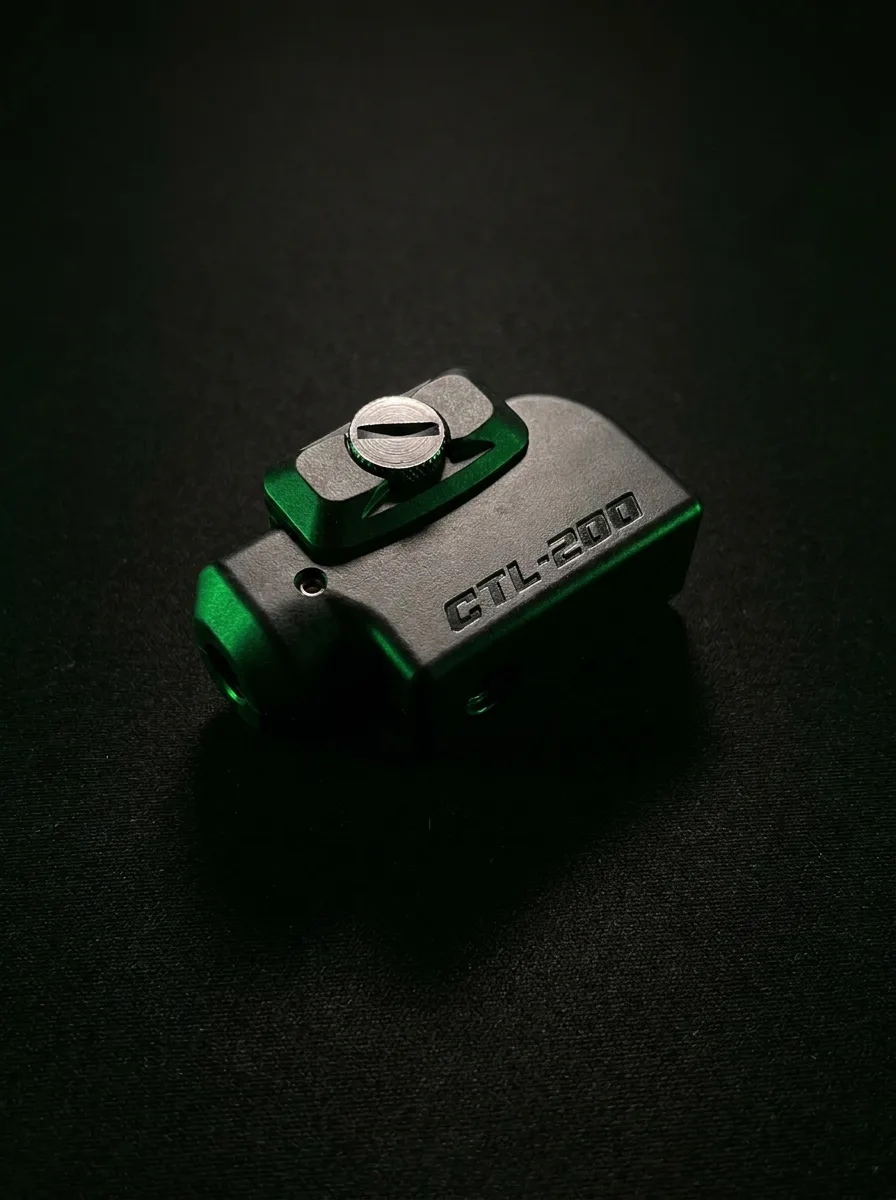
The CTL-200 easily mounts to many rail systems, such as Picatinny and Weaver. Featuring an adjustable design and a rechargeable battery (USB-C), ensuring sustained performance during normal use. CTL offers a limited 3-year warranty, restrictions apply.
- Utilizes patent-pending MALTS™ technology
- Laser activates upon weapon motion
- Enters sleep mode when at rest
- Laser automatically goes dark in High Ready and Low Ready positions
- Laser OFF when on its side
- Laser ON when aimed downrange
Product Overview
The CTL-200 is a motion and orientation-controlled laser designed to turn ON in a firing position and remain OFF in common non-engagement positions. This helps reduce unnecessary laser exposure while keeping the aiming reference available when needed.
- CTL-200 with MALTS™ technology
- Adapter cleats
- CTL wrench with 1.5 mm hex drive
- USB-C cable
- Laser safety labels
- Welcome and support materials
- Automatically activates in a firing position and remains OFF in common ready positions
- USB-C rechargeable for repeat use
- Designed to mount to common Picatinny and Weaver-style rail systems using included cleats
- Developed to reduce complex handling inputs such as buttons or switches during use
Quick Start
| STEP | ACTION |
|---|---|
| 1 | Charge the CTL-200 with the provided USB-C cable for about 2 hours using a compliant 5V USB charger. |
| 2 | Unplug the unit and confirm it enters Active Mode. |
| 3 | If needed, enable the unit using the Double-Tap Gesture. |
| 4 | Install the correct adapter cleat and mount the CTL-200 to the rail. |
| 5 | Move the firearm into a firing position to confirm operation. |
| 6 | Adjust windage and elevation as needed at the chosen sighting distance. |
Charging
Using the USB-C port, charge the battery for about 2 hours, or until fully charged. While charging, the laser will not activate, and the LED indicator will be GREEN. Once fully charged, the LED indicator turns OFF.
| WHAT HAPPENS | WHAT IT MEANS | WHAT TO DO NEXT |
|---|---|---|
| Red LED Blinking* | Low Battery | Charge unit |
| Green LED while plugged in | Charging | Leave plugged in |
| LED off while plugged in | Fully charged | Unplug and use |
| Two quick red LED flashes after unplugging | Active Mode | Ready to use |
| One red LED flash | Sleep Mode | Move unit to wake |
*When the LED is blinking red, the laser will not activate. The red blinking will persist until: (a) without motion, the unit enters Sleep Mode; (b) the battery is fully depleted; or (c) the unit is being charged.
Laser Activation
Your CTL-200 has no ON/OFF switch; it enters Active Mode after charging and also reacts to a gesture. During shipment, your laser is disabled. After charging, your laser enters Active Mode and is ready to use.
Use this gesture to switch between Active Mode and Disabled Mode. While disabled, the laser will not turn ON regardless of orientation.
| STEP | ACTION |
|---|---|
| 1 | Hold the laser level for 2 seconds (HORIZONTAL). |
| 2 | Point the laser straight down for 2 seconds (VERTICAL DOWN) and perform a Double Tap on the side of the unit with your finger. |
| 3 | Watch for the confirmation laser flash. |
| 4 | If needed, wait 5 seconds before retrying the gesture and do not otherwise jostle or bump the unit. |
| WHAT HAPPENS | WHAT IT MEANS | WHAT TO DO NEXT |
|---|---|---|
| Four quick laser flashes | Disabled | Use this mode for traveling. |
| Two slow laser flashes | Enabled | Ready to use. |
When in Active Mode, to DISABLE, simply repeat the Double-Tap Gesture. Use this mode for transportation where motion and orientation may inadvertently turn the laser ON.
If the unit doesn't enter/exit Disable Mode (indicated by laser flashing), simply wait 5 seconds and try again. Try increasing (or decreasing) the speed of your cadence accordingly. To quickly enter Active Mode, simply charge the unit (even momentarily). Once unplugged, the unit enters Active Mode.
Installation
Select & Install Appropriate Cleat: Included with your CTL-200 are an assortment of adapter cleats. Select the cleat which allows the unit to sit as close to the trigger guard as possible without making contact or interfering with the operation of your weapon. See the Weapon / Adapter Cleat Reference table in this guide for an abbreviated list of weapons and suggested adapters.
- Back-out the thumb screw, carefully retain the spring and movable rail clamp.
- Install the appropriate adapter cleat.
- Reengage the thumb screw into the movable rail clamp.
- Align the adapter cleat with your rail's slot.
- Push the spring-loaded thumb screw and snap the CTL-200 onto your weapon's rail from the side.
- Snug the thumb screw.
- Tighten the thumb screw with the included CTL wrench, a coin, or a flat screwdriver until the CTL-200 is secure.
- Confirm there is no contact with the trigger guard and no interference with your weapon's normal operation.
Operation
The CTL-200 employs our patent-pending MALTS™ technology to automatically control the laser based on weapon orientation. The laser turns ON when the firearm is in a firing position and remains OFF in common non-engagement positions.
- Pointed up in High Ready
- Pointed down in Low Ready
- Rolled onto its side
- Pointed downrange at your target
- Barrel Angle is within ±45° from horizontal
- Grip Angle is within ±60° from vertical (±30° from horizontal)
Barrel Angle Activation: While in Active Mode, the CTL-200 turns the laser ON and OFF based on the angle of the barrel relative to gravity. The Barrel Angle is programmed at ±45° from horizontal.
Grip Angle Deactivation, “Concealment Hold”: While in Active Mode, the CTL-200 turns the laser OFF when the weapon is rolled onto its side, regardless of Barrel Angle. This lets you keep the laser dark while the barrel stays trained on the target. Laying the firearm on a horizontal surface (on its side) also turns the laser OFF. The Grip Angle is programmed at ±60° from vertical (±30° from horizontal).
| MODE | DESCRIPTION |
|---|---|
| Sleep Mode | Lowest-power state. The unit enters Sleep Mode when the laser is OFF and no motion is detected for 10 seconds. Any motion wakes the unit and returns it to Active Mode. |
| Active Mode (Laser OFF) | The CTL-200 is awake and monitoring orientation. The laser remains OFF until the firearm is moved into a firing position. |
| Active Mode (Laser ON) | The laser turns ON when the barrel angle and grip angle meet the ON criteria. If the unit remains motionless for 20 seconds while the laser is ON, it enters Sleep Mode to conserve battery life. |
| Disabled Mode | The laser will not turn ON regardless of motion or orientation. Use during transportation or storage when motion may otherwise activate the unit. Enter or exit this mode using the Double-Tap Gesture. |
- No motion for 10 seconds with laser OFF → Sleep Mode
- Motion detected → Active Mode
- Correct firing position → Laser ON
- Double-Tap Gesture → Disabled / Enabled
Wake on Motion: When the CTL-200 is in Sleep Mode, any detectable movement wakes the unit and returns it to Active Mode.
Auto Sleep: To conserve battery life, the CTL-200 enters Sleep Mode after 10 seconds with the laser OFF and 20 seconds with the laser ON.
LED Feedback: When the CTL-200 enters Sleep Mode, the LED gives one red flash.
The unit may shift between Active Mode and Sleep Mode during normal handling, carrying, transportation, or storage depending on motion. This is normal operation.
- Prior to cleaning or servicing your weapon, always remove your CTL-200.
- Do not use acetone or other strong cleaning fluid or solvent on the housing or optical surfaces.
- For optimal laser performance, gently clean the laser lens with a cotton swab wetted with isopropyl alcohol.
- Operate the unit within the specified environmental range.
- Charge your battery regularly.
Laser Adjustment
Use the supplied 1.5 mm hex wrench to adjust windage and elevation (horizontal and vertical alignment). Make small corrections and verify alignment with your weapon's fixed sight at the chosen sighting distance. Alignment set screws move the rear of the laser module. Because of parallax, alignment will vary with distance.
Whether below the barrel or above it, sights are subject to a phenomenon known as Parallax. The laser dot and the point of impact will not align perfectly at every distance. This is normal.
Many users choose to sight the CTL-200 at approximately 21 feet. At distances closer or farther than the chosen sighting distance, the laser dot may appear slightly higher or lower relative to the barrel line.
Choose the sighting distance that best fits your intended use and understand that some variation at other distances is expected.
Charging Schedule
| USE CASE | RECOMMENDED INTERVAL | GUIDANCE |
|---|---|---|
| Range Use | After each day of use | Fully charge the CTL-200 after active use. |
| Daily Carry / Daily Use | Every 7 days | Charge weekly even if the laser was not activated. |
| Transportation / Intermittent Motion | Every 7 days | Motion during transport may cause the unit to cycle between Active and Sleep Modes. |
| Long-Term Motionless Storage | Once per month | Recharge monthly to maintain battery health and readiness. |
- Avoid fully discharging the battery.
- Use a compliant 5V USB charger and the provided cable.
- Charge the unit for about 2 hours or until fully charged.
Safety & Compliance
- Ensure all users are trained in the proper handling and use of the firearm, including its function and safety features.
- Ensure the firearm is unloaded, magazine removed and chamber is clear before installing or servicing the CTL-200.
- Always treat the firearm as if it were loaded.
- Always store your firearm so that children and other untrained people cannot gain access to it.
- Keep the firearm pointed in a safe direction.
- Keep your finger off the trigger until you are ready to fire.
- Be aware of your surroundings, your target, and what is beyond your target.
Use Disabled Mode (see Double-Tap Gesture) during transportation, storage, or other situations where motion or orientation may unintentionally activate the laser.
- Do not stare into the laser beam.
- Do not use binoculars, scopes, or telescopes to view the beam.
- Do not point the laser at faces or eyes.
- Do not point the laser at reflective surfaces that could redirect the beam.
- Keep the product out of reach of children.
- Do not tamper with the housing or internal laser components.
- Maximum output: ≤5mW
- Wavelength: 520 nm (green)
- Complies with 21 CFR 1040.10
- FCC: This device complies with Part 15 of the FCC Rules. Class B digital device.
- Use a compliant 5V USB charger with the provided cable.
- Keep the battery charged during normal use.
- Avoid fully discharging the battery.
- Avoid prolonged exposure to temperatures above 95°F or below 32°F.
- Avoid severe temperature swings.
- If the unit has been exposed to extreme heat or cold, allow it to return to ambient temperature before use.
- Avoid puncturing or damaging the enclosure.
- Do not use or store the battery near a fire or heat source.
- Do not dispose of the battery in fire or heat.
- Do not short-circuit, puncture, or disassemble the battery.
- Do not immerse the battery in water or seawater.
- Do not strike or crush the battery against a hard surface.
Key Terms
| TERM | DEFINITION |
|---|---|
| Danger | Indicates an immediate hazard that can cause serious injury or death. |
| Warning | Indicates a serious hazard that could result in injury or property damage. |
| Caution | Indicates a precaution that should be followed to avoid minor injury or product damage. |
| High Ready | A firearm position where the muzzle is angled upward and the laser remains OFF. |
| Low Ready | A firearm position where the muzzle is angled downward and the laser remains OFF. |
| Concealment | A firearm position with a horizontal muzzle and the firearm on its side; the laser remains OFF. |
| Active Mode | The CTL-200 is awake and monitoring orientation. |
| Sleep Mode | The CTL-200 is in a low-power state until motion is detected. |
| Disabled Mode | The laser will not activate regardless of motion or orientation. |
| Parallax | The visual difference between the laser dot and the actual barrel line at different distances. |
| MALTS™ | CTL's Motion Activated Laser Targeting System technology that uses motion and orientation to control laser activation. |
30-Day Return Policy
CTL offers a 30-day return policy for CTL-200 units purchased directly from CTL or from authorized affiliates. To request a return, contact CTL within 30 days of purchase and be prepared to provide:
- Your name and contact information
- Proof of purchase
- Product serial number
- Reason for the return
Returned products must be in acceptable condition and may be subject to inspection. Return shipping, restocking terms, and final approval should be confirmed with CTL at the time of the request.
Registration
Registration is optional and helps us serve you faster. Your 3-year limited warranty is active from the day your unit ships. You can register on our website at www.combattacticallaser.com/register
The product Serial Number Label is on the box, the Welcome Card, and is easily accessible on the unit itself.
Note: If you fully remove the thumb screw, take care to retain the spring.
Warranty
CTL MALTS™ Limited Warranty: CTL defends the quality and durability of our products. We are committed to delivering reliable and innovative laser solutions for our customers. This limited warranty reflects our confidence in the performance and craftsmanship of CTL products.
What Is Covered
This warranty covers defects in materials and workmanship under personal use and proper care for a period of three (3) years from the date of purchase, subject to the terms, conditions, and exclusions below. The warranty is valid for the original end user and applies only to products purchased from authorized affiliates or directly from CTL.
What Is Not Covered
- Normal wear and tear
- Cosmetic damage that does not affect performance
- Loss, theft, deliberate or accidental mishandling
- Misuse, abuse, neglect, or improper installation
- Unauthorized disassembly, modifications, or repairs
- Damage caused by strong solvents, including acetone
- Damage caused by improper storage, water exposure, or extreme environmental conditions
- Battery degradation over time
- Commercial use
- Products purchased from unauthorized dealers or resellers
Warranty Limitations and Exclusions
The total and complete liability of Combat Tactical Laser, LLC shall be limited to the original purchase price. CTL shall not be liable for incidental or consequential damages arising from the purchase, use or inability to use the product.
Transferability: This warranty is non-transferable and applies only to the original end user of the product.
Warranty Claims Process
To request warranty service, contact CTL customer support and provide: your name and contact information, proof of purchase, product serial number, and a description of the issue.
Upon approval of the warranty claim, and upon receipt of the returned item, Combat Tactical Laser, LLC will at its option: (A) repair the product using new or refurbished parts; (B) replace the product with an equivalent new or refurbished product; or (C) provide a partial or full refund of the original purchase price to you in exchange for return of the product. Shipping charges may apply.
Upon repair, any retained parts become the property of Combat Tactical Laser, LLC. For replacements and refunds, the returned item becomes the property of Combat Tactical Laser, LLC. Combat Tactical Laser, LLC is not responsible for any damages or costs incurred for any delay in completion of Warranty or Repair Services.
Quick Features Table
| FEATURE | DESCRIPTION |
|---|---|
| Laser | Green |
| Activation | Laser On/Off controlled with Motion |
| Mounting | Rail Systems such as Picatinny and Weaver |
| Battery | Rechargeable Lithium Ion |
| Charging Port | USB-C |
| Laser Adjustment | Horizontal and Vertical with Included CTL Wrench |
| Housing | Impact-Resistant Glass-Filled Polymer |
| Color | Black |
| Environment | Water Resistant (do not submerge) |
Specifications
| Wavelength | 520nm |
| Output | ≤5.0mW |
| Class | IIIa |
| Beam Size | <10 x 20mm @ 20m (<0.4″ x 0.8″ @ 65 ft) |
| Working Life Span | 8,000 Hours @ 25°C |
| Type | Lithium-Ion |
| Capacity | 330mAh, 3.7V |
| Charge Time | Approximately 2 hours |
| Charge Amperage | <½ amp |
| Cycle Life | ≥300 @ 80% capacity |
| Self-Discharge | 28 days to 90% capacity |
| Operating Temp | -10°C to 50°C (14°F to 122°F) |
| Operating Humidity | 40% to 90% RH |
| Charging Temp | 0°C to 45°C (32°F to 113°F) |
| Storage Temp | -5°C to 35°C (23°F to 95°F) |
| Storage Humidity | 40% to 75% RH |
| Length | 51.3 mm (2.02″) |
| Width | 28.2 mm (1.11″) |
| Height | 29.8 mm (1.17″) |
| Weight | 25g (0.9 oz) |
*Based on ambient conditions at sea level; actual results may vary.
Product Description
The CTL-200 is powered by a high-capacity Lithium-Ion rechargeable battery, ensuring sustained performance during normal use. With a wide operating temperature range of 14°F to 122°F, the CTL-200 is engineered to deliver reliable performance for your needs. Featuring a modern USB-C charging port, the CTL-200 offers convenient, quick recharging.
Equipped with a premium-grade, FDA compliant laser, the CTL-200 delivers exceptional visibility, even in daylight. It mounts easily to Picatinny and Weaver rail systems using our included adapters. Some manufacturers deviate from these specifications, if you have any problem mounting the laser on your weapon, please contact us.
Great for tactical situations, the CTL-200 doesn't require a mechanical button or a switch. There are no moving parts, except the user. This saves you from having to regrip, fumble with buttons to find the right mode, or peer through a hole and risk losing sight of your periphery.
For recreational shooters, we simplify the mission: put the laser on your target, and that's where the round goes. Point it up, point it down, or lay it down, and the laser goes off.
Weapon / Adapter Reference
Find and install the included rail adapter as appropriate.
| WEAPON | RECOMMENDED CTL-200 ADAPTER |
|---|---|
| Beretta PX4 Storm | A – Cleat |
| Sig Sauer P320, P226 | A – Cleat |
| Smith & Wesson M&P9 | A – Cleat |
| Walther PDP | A – Cleat |
| Weapons with Picatinny rails (most) | A – Cleat |
| Glock: most handguns | C |
| Heckler & Koch VP9 | D |
If you have any problem mounting the laser on your weapon, please contact us at support@combattacticallaser.com or (443) 517-3303.